
Shopify's native 3D and AR viewer covers the basics free, which raises an awkward question for every plugin app in the store: what exactly are you adding? The fastest way to answer it is to stop reading app-store copy and look at the retail examples that already work. We track 68 of them. Counted by launch year, they tell you when AR commerce actually arrived, and how mature the pattern you are copying really is.
The examples, counted by launch year
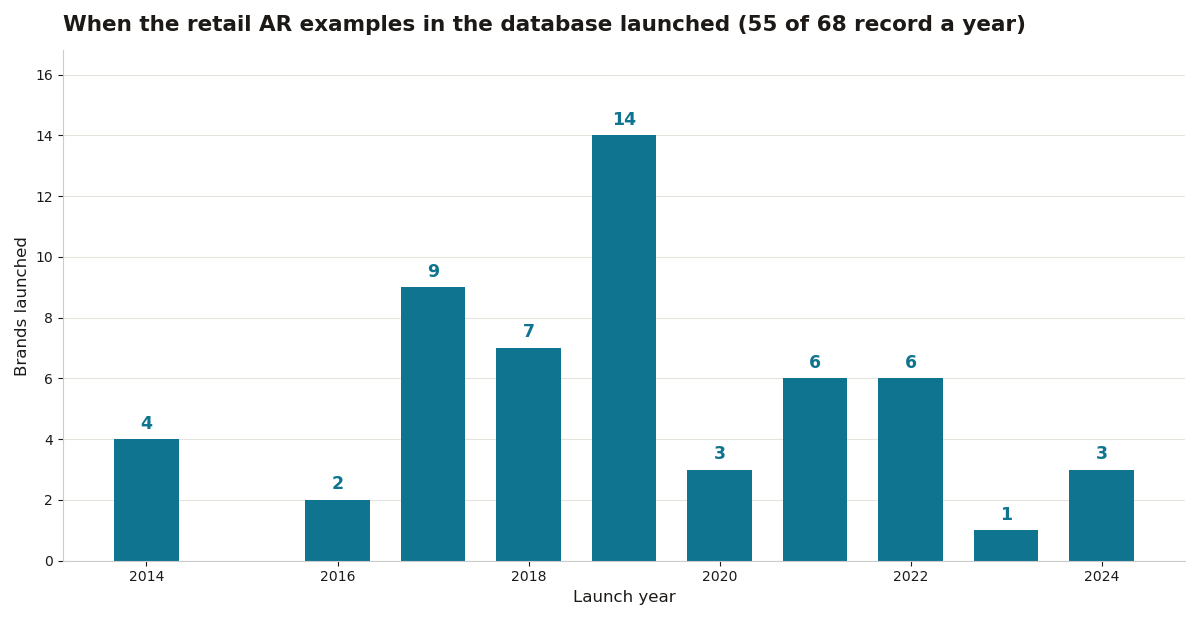
The wave is unmistakable. The earliest recorded example launched in 2014, and 30 of the 55 dated brands went live in the three years from 2017 to 2019, peaking at 14 launches in 2019 alone. IKEA Place (2017) sits in that wave, alongside the first big beauty try-on rollouts. Launches since have been steadier and thinner: 6 in 2021, 6 in 2022, 1 in 2023, 3 in 2024. These are the examples that survived and stayed documented, not a census of everything attempted, but the shape matters for a buyer: the plugin patterns worth copying are seven to nine years old, tested by millions of shoppers, and built into platform natives. A plugin asking monthly rent in 2026 has to beat a mature free baseline, not a blank page.
What the working examples have in common
Read across the 68 records and three habits repeat. The AR entry point sits on the product page, not in a separate app: Amazon AR View, the IKEA Kreativ flow and the car configurators all start where the buy button lives. The model loads fast enough that the shopper never sees a spinner long enough to leave. And the experience answers one question per product, will it fit, will it match, what does this trim look like, rather than offering a generic 3D toy. Plugins that copy those habits are candidates. Plugins that add a floating AR hub, a separate viewer page or a branded mini-app are copying the failed pattern instead.

Check before installing: the six tests
- Page speed impact. 3D is heavy; a plugin that adds two seconds of load time will cost more conversion than AR gains. Test with real throttling, not office wifi.
- Format handling. Must accept GLB and USDZ and serve the right one per device automatically.
- Theme compatibility. Some plugins fight with custom themes. Test on a duplicate theme first.
- Analytics. Does it report AR launches, interaction time and conversion of AR users? Without this you cannot measure ROI.
- Pricing model. Monthly fees for a viewer plugin add up; one-time licenses or native (free) usually win.
- Variant support. Color and size variants should swap the 3D model, not just the photos.
Sources: Shopify
Viewer plugins are commodities; analytics is the real gap
The launch-year wave explains the app store's shape. When the examples were young, a viewer plugin was the product: somebody had to render the model. Platforms absorbed that job years ago, so a 2026 plugin that only displays GLB files is charging rent for a commodity. What the examples still lack, and what the records make visible, is measurement. Only 12 of the 68 brands publish any result figure, and the tooling gap behind that silence is where a plugin can still earn money: clean AR launch events, conversion split by AR and non-AR sessions, and return-rate tagging without a developer. When you run the six checks, weight analytics accordingly. A plugin that renders beautifully and reports nothing leaves you exactly where the 56 silent brands are, with an experience and no evidence.
Start with native, and bring your own model
Start with native. Add a plugin only for a named missing feature, and name it before you shop. The other half of starting is the model itself: a plugin cannot fix a product that has no 3D asset. Our free turns one product photo into a relief model you can export and load into the native viewer today. Walk the six checks with a real model on a real product page and the answers stop being theoretical. That is the lesson the 68 examples teach, from IKEA down: the winners shipped a model, measured what happened, and let the results, not the app store, decide what to pay for next.